
Power management isn’t something most people think about until something goes wrong. A fiber cable snaps. A laser shoots out uncontrolled light. An access point blasts a signal into an already crowded room. That’s where automatic power reduction (APR) steps in. It’s a built-in safety net that cuts power when conditions get risky or when full output simply isn’t needed. This isn’t some niche tech feature — it’s running in data centers, telecom networks, and wireless systems right now. This guide breaks down what APR actually does, where you’ll find it, and why it matters for anyone running serious network gear.
Key Takeaways
- APR drops power output automatically when faults or inefficiencies show up.
- It protects people from harmful laser light and keeps equipment from frying.
- You’ll see it in optical networks, wireless access points, and even inside digital chips.
- It’s not the same as shutting a device off — it’s smarter than that.
What Is Automatic Power Reduction?
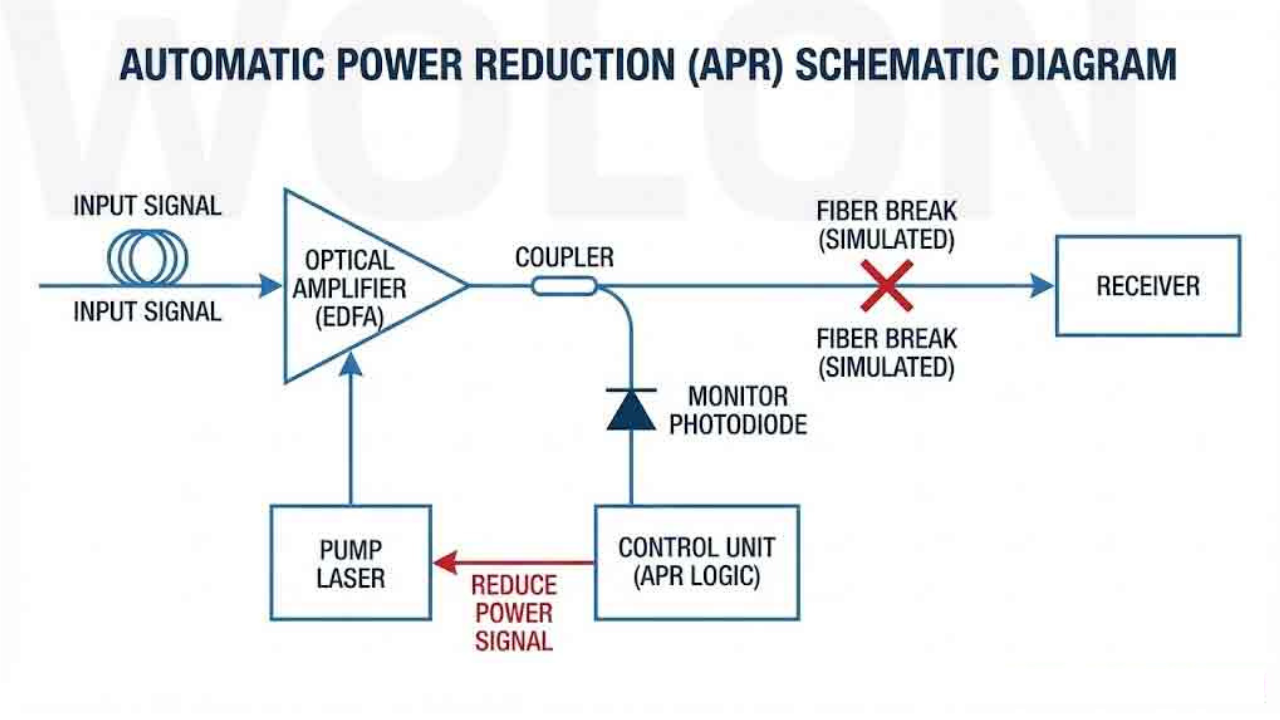
APR is a control system that watches how a device is performing and scales back its power when things look off. In optical networks, that means sensors keep an eye on signal levels. If a fiber breaks or a connector pops loose, the system senses the drop and immediately lowers the laser output. No human has to flip a switch. The whole thing happens in milliseconds.

The same idea shows up elsewhere, too. Wireless access points dial down transmit power when the room is already saturated with signal. Digital chips shut off clock signals to idle circuits so they aren’t burning energy doing nothing. The core principle is the same across all of it — only use the power you actually need, and pull back fast when danger shows up.
Why Automatic Power Reduction Matters
- Keeps people safe. High-power lasers can damage the eyes. APR makes sure that light doesn’t escape into open space if a fiber breaks.
- Saves hardware. Sudden power surges or running hot for too long kill components early. APR prevents both.
- Cuts waste. Why blast full power when half will do? Less heat, lower electricity bills, longer device life.
- Keeps networks running. By reacting automatically to problems, APR reduces downtime and the need for emergency repairs.
- Meets legal requirements. Optical safety standards like IEC 60825-1 demand built-in power reduction. APR is how manufacturers comply.
How Automatic Power Reduction Works
The process is straightforward but fast:
Monitor: sensors track signal levels, temperature, or RF conditions nonstop.
Detect: if something drops below a safe threshold or spikes above it, the system flags a fault.
Reduce: power gets cut to a pre-set safe level based on programmed rules.
Probe: Some systems send low-power test signals to check if the problem cleared before ramping back up.
That probe step is important. It means the system doesn’t just stay down forever. Once the fiber is reconnected or the interference clears, normal operation resumes without anyone having to reboot anything.
Read Also: SFM Compile: Complete Beginner’s Guide to Source Filmmaker Rendering
Automatic Power Reduction in Optical Networks
Optical networks use lasers to push data across long distances. Those lasers can get powerful — dangerously so. If a technician is working on a cable and the laser is still firing at full blast, that’s a real hazard. APR solves this by watching return loss. When the signal bouncing back drops too low, the system knows the fiber path is broken and kills the output.
What APR protects in optical systems:

| What It Protects | How |
| Technicians | Prevents eye exposure to invisible infrared laser light |
| Connectors and cables | Stops overheating and fiber fuse effects |
| Regulatory compliance | Meets IEC 60825-1 and similar safety standards |
Automatic Power Reduction in Network Equipment
1. Meraki’s Auto RF and Auto TX Power Management
Cisco Meraki access points use automatic power reduction through their Auto RF and Auto TX Power features. Instead of locking every access point to max transmit power all day, the system reads the room. If devices are close together or the RF space is crowded, it dials power down. Less overlap, less noise, better performance for everyone.
How to enable it:
- Go to Wireless > Configure > Radio Settings in the Meraki dashboard.
- Turn on automatic power reduction or set your own min/max ranges.
- Let the network adapt on its own.
2. Ciena’s Optical Alarms and APR
Ciena’s 6500 platform uses APR at amplifier points. When return loss goes weird or a mismatch pops up, the system triggers power reduction and throws an alarm. Operators see the alert, fix the fiber issue, and the system comes back up. It’s proactive protection rather than waiting for something to burn out.
APR in Optical vs. Wireless Networking
| Aspect | Optical APR | Wireless Power Control |
| Main goal | Safety — stop harmful laser output | Efficiency — cut interference and save energy |
| What triggers it | Fiber break, signal loss, connector issue | RF congestion, nearby access points and low traffic |
| Action taken | Drops or shuts off laser output | Adjusts transmit power up or down |
| Why it exists | Protect people and meet safety laws | Improve coverage and reduce power waste |
| Typical gear | EDFAs, WDM systems, long-haul transceivers | Wi-Fi access points, wireless radios |
Power Reduction Techniques in Digital Systems
Clock gating is the big one here. In digital chips, the clock signal flips constantly and burns power every time it switches. Clock gating turns off the clock to parts of the chip that aren’t doing anything right now. No switching, no wasted energy.
The dynamic power formula tells the story:
P_dynamic = α × C × V² × f
- α = how much the circuit is actually switching
- C = capacitance
- V = voltage
- f = clock frequency
Clock gating slashes α. When a block is idle, its α drops to zero. That can cut total power significantly in large network processors and ASICs.
Automatic Power Reduction vs. Automatic Power-Off
APR scales back. Power off kills everything. Some systems do both — APR first as a warning shot, full shutdown if the problem persists. Think of APR as tapping the brakes. Power-off is slamming them.
Power Reduction Formulas
In electrical systems, power factor correction uses this:
Qc = P × (tan φ₁ – tan φ₂)
Where Qc is the reactive power you need to add, P is real power, and the tan φ values are your current and target phase angles. This isn’t APR exactly, but it’s part of the same family — automatic systems managing power quality without human intervention.
Automation Tools and Power Management
Software plays a role, too. Microsoft Power Automate can schedule flows that shut down virtual machines or services during off-hours. There’s even a pattern called “Power Automate turn off flow” for exactly this. Removing unnecessary loops like “apply to each” also trims CPU load and saves power at the software layer. Hardware and software working together get the best results.
Best Practices
For optical networks:
- Enable APR on every amplifier and transmitter that supports it.
- Watch for “Automatic Power Reduction Active” alarms — they mean something broke.
- Don’t skip fiber inspections just because APR is there. It’s a backup, not a replacement.
For wireless (Meraki):
- Let Auto Power run instead of forcing max output.
- Set reasonable power floors and ceilings.
- Check coverage maps regularly to catch dead spots early.
For digital systems:
- Use design tools that insert clock gating automatically.
- Test power with and without gating to know your savings.
Final Word
Automatic power reduction isn’t flashy, but it’s everywhere that matters. Optical networks use it to stop lasers from hurting people. Wireless systems use it to keep signals clean and power bills low. Digital chips use clock gating to stay cool. Together, these techniques make modern networks safer, cheaper, and more reliable. Engineers who understand APR build systems that last longer and break less. That’s worth knowing whether you run a data center or just want your Wi-Fi to stop dropping.
1. What triggers APR in optical networks?
Answer: Fiber breaks, loose connectors, or any sudden signal drop. The system senses the change and cuts power before harm happens.
2. Can APR improve wireless performance?
Answer: Yes. By lowering transmit power in crowded RF environments, Meraki and similar systems reduce interference and improve overall network quality.
3. Is clock gating the same as power gating?
Answer: No. Clock gating stops the clock signal to idle circuits. Power gating cuts the actual voltage supply. Power gating saves more but is harder to implement.
4. Does APR replace regular maintenance?
Answer: Not at all. APR handles emergencies automatically. Maintenance catches problems before they trigger APR in the first place. You need both.
Read More: FFRIntas Login 2025: Complete Guide to Access Your Account & Company Overview