
Cars today are packed with screens and sensors. Symbols will flash on the instrument screen, touchscreen or even the windscreen, and many of them are only infrequently (or never) displayed. Most drivers don’t know what it means when one of the lights comes on.
So, how do I use Search Live to find out what signs are indicating on my car’s dashboard? It’s not as difficult as you might imagine. This article will tell you what each warning colour is and the simple steps to take and some other tools you may want to try.
Why Dashboard Signs Can Feel Confusing
Older vehicles had a limited number of lights to warn of what was wrong, such as oil, battery, and fuel. Today’s automobiles are more like a plane cockpit. Signs may be displayed on the instrument cluster, infotainment screen or even a head-up display. There are even some cars with a display at the bottom of the windscreen.
There are a lot of symbols that aren’t used very often, so you might never come across them. They are all explained in the owner’s manual, but it is a long read and NOT many people read it. If you do, finding the meaning of each symbol isn’t easy.
How to Identify Dashboard Signs Using Search Live and Other Tools
Use Visual Search
This is the quickest method. Using your phone, download Open Search Live or Gemini Live, and hold the camera up to the sign on your car’s dashboard. The AI analyzes the image and provides details about its content and what to do.
- Use Open Search Live, or Gemini Live.
- Allow camera access.
- Grip the phone firmly and try to focus on the symbol.
- Read out sounds or listen to the answer.
Google app and Google’s “Bing” can also do the job. In best practice, do not include glare and make sure the symbol is in the middle of the frame.
Use Voice Search
Useful to have around you when you are busy, like Google Assistant and Siri. Explain what the sign said, along with its shape and color, and any words on the sign. For instance, a red light that is shaped like an oil can. The assistant will make a guess about what it could be and what they should do.
While driving, don’t text. If you have a passenger, ask them to assist or pull over before they do.
Use Dedicated Car Apps
Car Scanner ELM OBD2 and Torque Pro are apps that can interface with your car via a small plug-in device. No guesswork as they read the car’s fault codes. This makes them more precise than a search for a camera. But a code seldom refers to the broken component, not the system, so it’s possible you’ll still need a mechanic.
Understanding the Urgency of Dashboard Signs by Color
The colour of a sign indicates an urgency to action. This is an easy-to-follow guide.
Flashing Red
This is the most dire warning. It is typically indicative of a hazard in the near term. Stop at a safe location, turn off the engine and do not drive any further. Rather call for help.
Solid Red
A steady red light means there is a serious problem such as engine overheating, oil pressure or the brakes. Do not ignore it. Seek an appropriate location to stop, assess the problem as soon as possible.
Yellow or Orange
The following signs are advisory. The car is driving quite well for a while, but there’s something that needs to be done. Check the problem promptly, before the minor problem can become a costly repair.
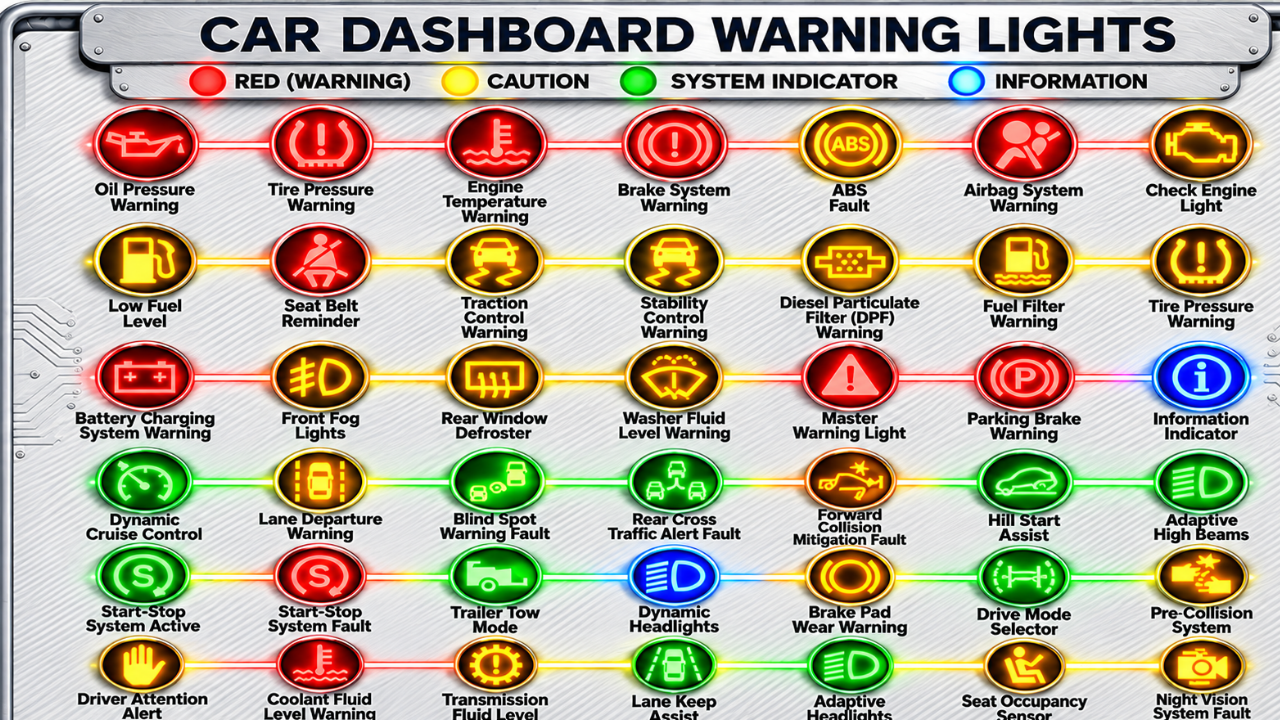
Blue or Green
These are just indications. They illuminate an indicator, like high beams, cruise control or indicators, that a system is on. There is no action to take.
Final Word
The days of dashboard mysteries are over! You now understand how to use Search Live to find the signs that will be appearing on your car’s dashboard – just open the app, point the camera and read the answer in seconds. Nevertheless, use the results of AI as a starting point. With more serious warnings, check your owner’s manual or trusted mechanic to confirm.
FAQs
1. Does Search Live detect all the dashboard symbols?
Can explain the meaning of most common symbols, although success will vary with your car model and the quality of the images.
2.Can I use Search Live while driving?
No, stop safely, or for passengers to check symbols. While providing a hands-free option, voice assistants should be a red warning to end driving, not continue to search.
3. What is the meaning of a red dashboard light that is flashing?
Indicates a critical issue that may lead to mechanical failure at any time. If you can, stop in a safe place, turn off the engine and call for assistance rather than proceed on your own.
4. Do OBD apps work better than visual search?
OBD apps are real fault code readers, and therefore more accurate in locating faults. Simple learning of the meaning of a symbol is faster when using visual search.
5. Can I overlook the warning lights in yellow or orange?
No. They are advisory only and the car may still be roadworthy, however check the issue as soon as possible. You can make a small problem a big, expensive one by postponing too long.
Read More: NBM Login: How to Access the Navasakam Portal Without Losing Your Mind